

Navigation
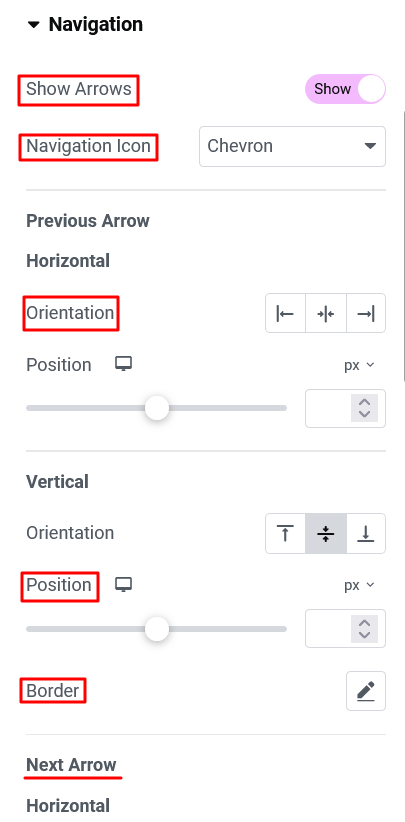
- Show Arrows:- If you don’t want to show arrows, then you can disable this option.
- Navigation Icon:- If you want to change the navigation arrow, then you can select from the navigation icon option.
- Horizontal Orientation (Previous/ next arrow) :- You can change the horizontal position of previous / next arrow to left, center and right.
- Position :- You can also set the position of the icon horizontally using this option.
- Vertical Orientation :- You can change the vertical position of the previous / next arrow to top, middle and bottom.
- Position :- You can also set the position of the icon vertically using this option.
- Border :-
- Border Type option provides different types of border for navigation buttons.
- Border Radius is used for set radius of border.
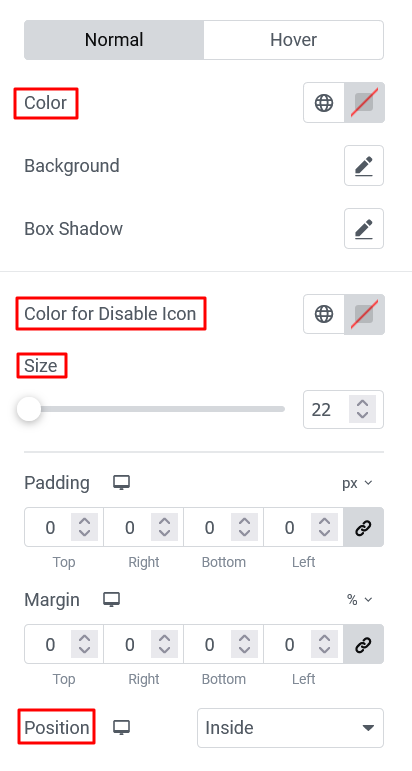
- Color :- This option is used for the navigation icon color.
- Background :- This option sets the background color of the navigation icon.
- Box Shadow :- This option use for give shadow to the navigation icon.
- Color For Disable Icon :- Color for disable Icon gives color to a navigation icon that is disabled at the last slide and at the first slide of the carousel.
- Size:- Size option used for set the size of the navigation icon.
- Padding :- This option is used to give padding to the navigation icon.
- Margin :- This option is used to give margin to the navigation icon.
- Position:-
- Inside option set the location of the navigation buttons inside the swiper-container.
- Outside option set the location of the navigation buttons outside the swiper-container.
Pagination
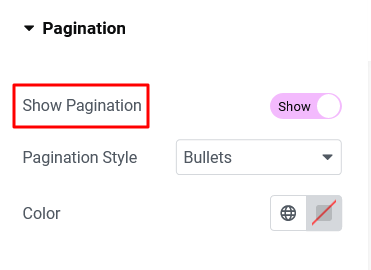
- Show Pagination :- You can set the pagination to slider by enabling the show pagination option.
- Pagination Style :- This option provide you bullet style pagination, fraction style and progress bar style pagination.
- Color :- Color option sets the color of pagination.